Batch Image Watermark — Free, No Upload or Signup
Batch watermark JPG, PNG and WebP images in your browser. Set text once, preview every photo and download PNG/JPG files in a ZIP. Free, no signup, no file uploads.
- Processed on your device
- Free to use
- No account needed
How it works
- Choose or drop one or more PNG, JPG/JPEG or WebP images. Process PDFs separately from images.
- Enter text and adjust the style. Every image preview updates together; check the result at different image sizes.
- Choose PNG or JPG, download a batch as a ZIP, or combine images into a PDF in the selected order. Original pixel dimensions are kept unless size controls are used. PNG retains transparency; JPG uses a white background.
Prepare photos, product images or design previews with one shared set of text, size, color, opacity, rotation and tiling options. You do not need to repeat the settings on each image.
Watermark preview example
Adjust the text, opacity and angle to keep both the watermark and your content clear.
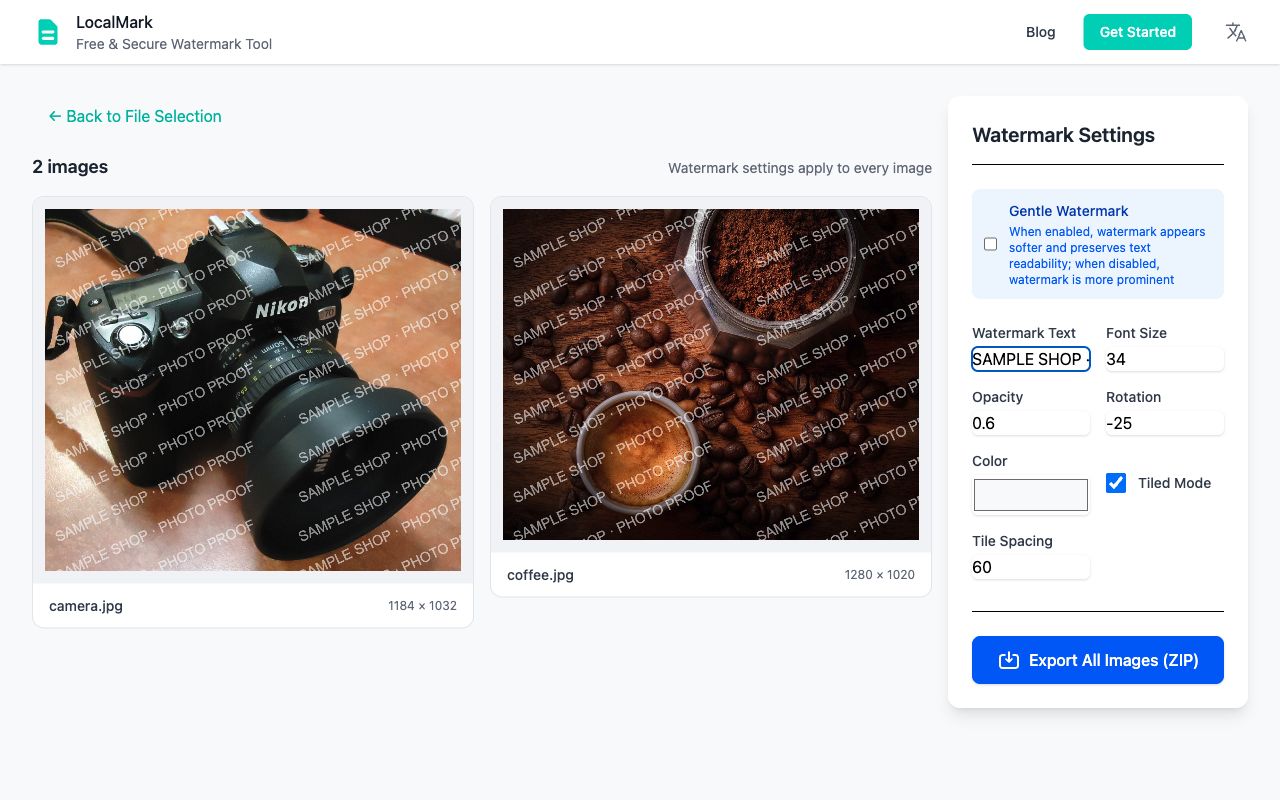
One watermark setup for the whole batch
Choose several photos, enter your text once and enable tiling. Changes to the text, opacity, color and angle update every preview together. Check bright and dark backgrounds before exporting; split very different images into separate batches if needed.
Choose how to download your watermarked images
- PNG or JPG in a ZIP: keep separate images for product listings, photography proofs or sharing.
- Multipage PDF: keep the selected image order for client review, one image per page.
- Smaller review copies: use maximum dimensions or target size; compression may reduce detail.
Keep your clean originals. Extract the downloaded ZIP and inspect several images, including the smallest text and transparent edges. JPG uses a white background; PNG can preserve transparency.
Can I batch watermark images without uploading them?
Yes. Image processing and export run locally in your browser, with no account or processing upload. The first visit needs a connection to load website resources. Use Prepare offline while connected to reopen the prepared tool offline later.
Can I add a logo or different text to each image?
LocalMark adds text watermarks with shared settings. It does not add logo watermarks or automatically assign a different recipient, filename or watermark to each photo. Process separate batches when the wording needs to differ.
How many images can I watermark at once?
The practical limit depends on image dimensions and device memory. Start with a small set, save the output and split large high-resolution collections into batches. There is no promised unlimited batch size.
Follow the batch photo watermark workflow or the design-proof review workflow for a complete handoff.
Your files stay on your device
Local-first file processing means the browser reads and processes the files you choose on your own device. LocalMark does not send image or PDF contents to a processing server. Opening the website still downloads its pages and tool resources.
Local-first tools. Your files stay on your device.Text watermarks are supported; logo watermarks are not. Batch size depends on device memory, so split large high-resolution collections into smaller batches. A watermark cannot guarantee protection against copying or removal.
A few things to know.
Are my files uploaded?
No. Image and PDF processing happens in your browser.
Do I need an account?
No sign-up or payment is needed for these tools.
Can I keep working offline?
Use “Prepare offline” to download the tool. Keep this tab open while working.
What happens to my original?
Your original is not overwritten. Download a separate processed copy.