“I prefer the second one” is not useful feedback when the client is looking at yesterday’s export and you are looking at today’s reordered concepts. A design proof needs a recognizable version, a clear purpose and a dependable way to refer to each option.
LocalMark helps with the handoff after you export your artboards. Apply shared text watermarks to a batch, preview every image, then send individual images or one multipage PDF. Unreleased brand concepts stay in your browser during processing. It is free and does not require an account.
Define what the client is deciding
Separate concept selection from detailed copy and production approval. A brand presentation might contain three visual directions; a web review might contain desktop and mobile versions of the same page. Export only the options belonging to this round, keeping the source files and clean exports separately.
Name the review copies before importing them, for example 01-concept-A-v02.png and 02-mobile-header-v02.png. A useful shared watermark is EXAMPLE CLIENT / v02 / REVIEW ONLY. LocalMark applies one text and style to the whole batch; it does not generate a different artboard name, revision or recipient for each image.
Build the review set
- Try the web-design sample, or select your own PNG, JPG or WebP artboard exports. Export native PSD, AI or other design files in the authoring application first.
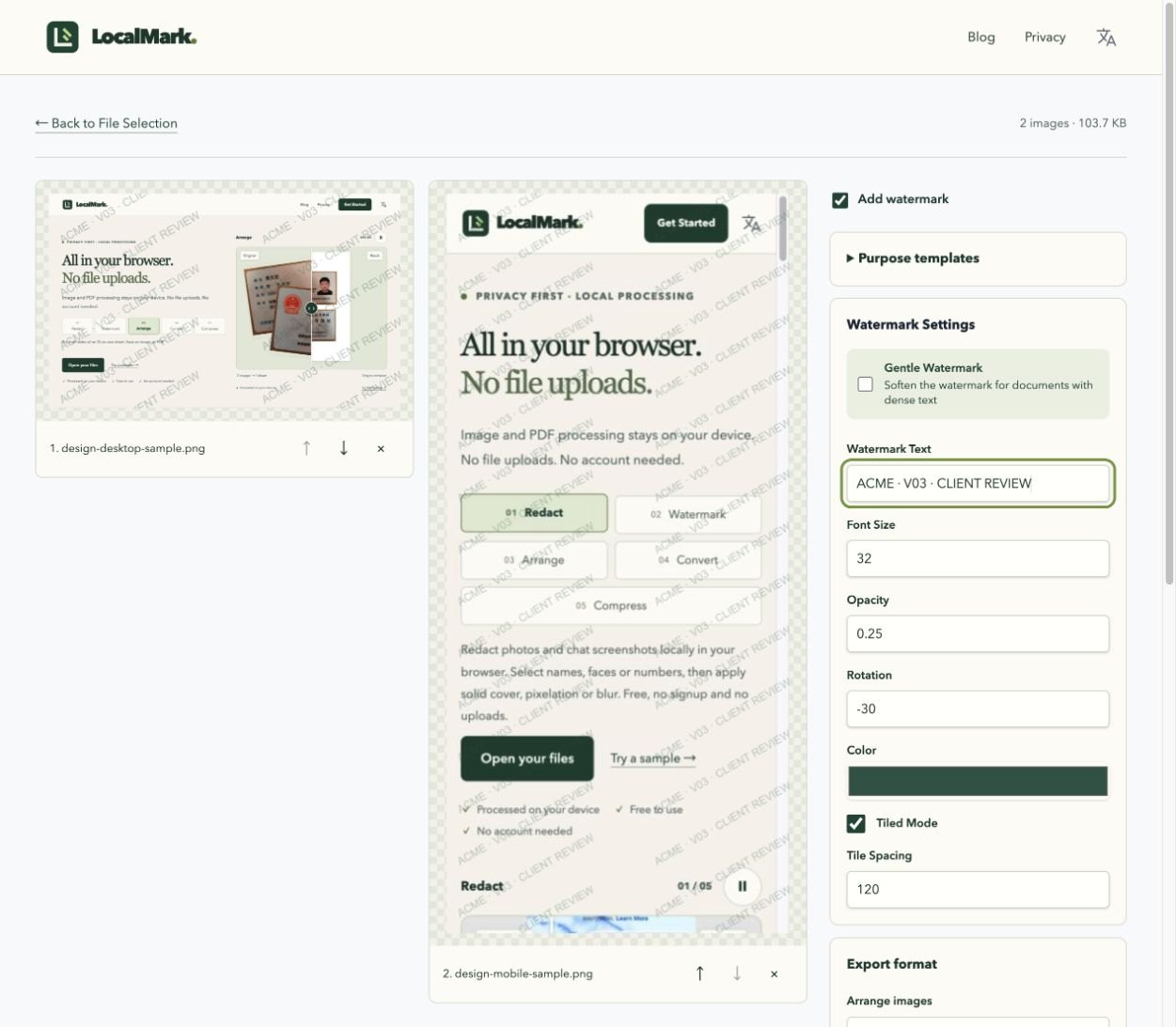
- Enter the client, revision and review purpose. Enable tiling and adjust opacity, spacing, text size and angle; every preview updates together.
- Check a light artboard, a dark one and the smallest labels. Keep the review label visible without covering the details the client is supposed to judge. Split substantially different layouts into separate batches when needed.
- Choose the output that matches how the client will reply, then inspect the generated file before sending it.
Choose images, a PDF or a two-image sheet
| Review task | Output | Feedback convention |
|---|---|---|
| Compare a sequence of concepts | One image per page in a PDF | “v02, page 3, heading” |
| Share individual assets with collaborators | PNG or JPG in a ZIP | Keep the numbered filenames in replies |
| Compare exactly two versions on a sheet | Two-image layout, saved as an image or PDF | Identify which side is the earlier version |
In the watermark workspace, switch the image layout to multipage PDF to keep watermarking and packaging in one pass. Choose original dimensions for differing artboard proportions, or A4/Letter for consistent pages. The image order becomes the page order.
The two-image layout is fixed and accepts exactly two images. It is not an arbitrary contact sheet or a freeform proposal board. Build complex grids, annotations and measurement guides in your design application first.
Where local processing helps
The useful combination is less repetitive setup, a consistent review sequence and no upload to another processing service. This can matter for an unreleased campaign, a client’s internal copy or a concept that should not leave the project yet. Once you download and share the result, its audience and onward sharing still depend on your project arrangements.
LocalMark does not host review links, collect comments or record approval. If you need comments attached to artboards, use a review system such as Illustrator Share for review. A watermark labels a copy; it does not enforce payment terms or prevent editing.
Close the review round cleanly
Send one explicitly named package, retire the previous round and ask for feedback against the version and page numbers. Produce the next round and final delivery from the source artwork, not by removing a mark from the proof.
LocalMark PDFs are for screen review. Existing PDFs are rasterized during watermark export, so selectable text, links and vector detail may not survive; this is not print preflight or editable-source delivery. Before sharing a screenshot of feedback, redact personal details. For photography selection rather than design approval, see the photographer’s proof-set workflow.
Rehearse the handoff with two sample artboards
Open the desktop and mobile samples. Enter EXAMPLE CLIENT / v02 / REVIEW ONLY and enable tiling. Start with low opacity, then increase it until the review label is visible while small interface text stays readable. Check both previews; the same settings apply to both images.
For page-based feedback, export a multipage PDF with desktop first and mobile second. For separate assets, choose PNG or JPG and download the image package. Name the review file example-client-v02-review.pdf and ask for comments such as “v02, page 2, button text”.
Open the downloaded file and check page count, order, tiled labels on every page and the smallest text. A multipage PDF places images on separate pages; the two-image layout places exactly two images on one sheet. Neither output records client approval. After approval, export the final deliverables from your source artwork and keep the versioned review copy with the project.